Smart speakers have become a common part of connected homes, combining audio playback with voice-controlled access to information, entertainment, reminders, and compatible smart-home devices. Instead of opening an application or reaching for a phone, users can speak naturally to a voice assistant and ask it to perform supported tasks.
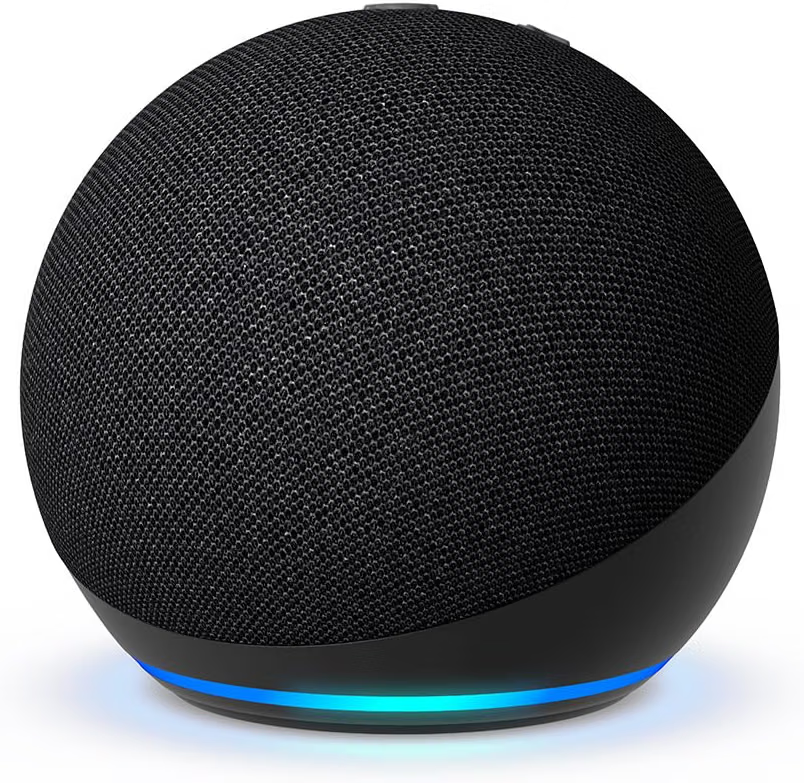
The Amazon Echo Dot in Charcoal is a compact smart speaker designed for everyday spaces such as bedrooms, dining rooms, offices, kitchens, and other areas where a small voice-controlled device can be useful. The product is presented as a vibrant-sounding speaker designed for Alexa+, bringing together audio playback and Alexa-based functionality in a relatively small form factor.
The appeal of a device in this category is not limited to playing music. A smart speaker can become a convenient interface for timers, alarms, reminders, weather information, compatible smart-home controls, and hands-free interactions. It can also serve as a central point for routines that connect several devices or actions.
At the same time, a smart speaker is not simply an ordinary speaker with a microphone. It depends on software, an internet connection for many cloud-based functions, an Amazon account, and compatibility with supported services and devices. Features can also change as Amazon updates Alexa and related services.
Understanding those differences is useful when deciding how a compact Echo Dot can fit into a home or workspace.
This guide explores the Echo Dot’s role as a smart speaker, its key characteristics, practical applications, smart-home possibilities, privacy considerations, and the differences between a voice assistant speaker and other types of connected devices.
What Is the Amazon Echo Dot?
The Amazon Echo Dot is a compact smart speaker built around Alexa.
Its primary interaction method is voice.
Instead of requiring a touchscreen or keyboard for many everyday requests, the user can speak to the device after activating the Alexa assistant.
The speaker can then respond to supported requests using its built-in audio system.
This makes the Echo Dot different from a traditional Bluetooth speaker.
A conventional Bluetooth speaker is primarily designed to reproduce audio from another device. An Echo Dot combines audio playback with an intelligent voice interface and access to connected services.
The device can therefore occupy several roles in the same room.
It can be an audio speaker, an alarm clock alternative, a kitchen timer, an information assistant, a smart-home controller, or part of a broader household automation system.
The specific capabilities available to an Echo Dot can depend on software, account settings, connected services, compatible smart-home products, region, and the current Alexa experience.
Key Features
Compact Smart-Speaker Design
The Echo Dot is designed to take up relatively little space.
This makes it practical for locations where users want voice access without dedicating a large amount of room to a speaker.
A bedside table, office desk, kitchen counter, shelf, or dining area can provide a suitable location depending on the household’s needs and access to electrical power.
Its compact design also makes it relatively easy to place in multiple rooms.
Rather than treating the device as a centerpiece, users can position it where voice interaction is most convenient.
Alexa Voice Assistant
Alexa is the central software experience behind the Echo Dot.
Voice interaction allows users to ask questions, request information, control supported devices, manage timers and alarms, play audio, and perform other supported tasks.
One of the practical benefits of voice control is that it can reduce the need to interact with a screen.
For example, someone preparing food can set a timer without touching a smartphone. Someone working at a desk can request a reminder without interrupting the task to open an application.
The usefulness of voice control depends on the accuracy of speech recognition, network connectivity, supported services, and how naturally the user incorporates commands into daily routines.
Designed for Alexa+
The product listing describes the Echo Dot as designed for Alexa+.
Alexa+ is an evolving version of Amazon’s Alexa experience that expands conversational and assistance-oriented capabilities.
Because AI-powered assistant functionality can change through software updates, users should distinguish between hardware capabilities and the services currently available through Alexa.
Some functions may require particular account arrangements, subscriptions, compatible services, or regional availability.
The underlying idea is that a smart speaker can become a more conversational interface rather than functioning only as a command-and-response device.
Audio Playback
The Echo Dot is also a speaker.
Users can use compatible services to listen to music, podcasts, audiobooks, radio, or other available audio content.
The compact size makes it particularly suitable for background listening in everyday rooms.
A small smart speaker is not necessarily intended to replace a dedicated home audio system in every situation. Audio requirements vary considerably depending on room size, listening distance, preferred volume, and expectations for bass and stereo sound.
For casual listening and voice interaction, a compact speaker can serve a different purpose from a larger dedicated audio setup.
Charcoal Finish
The Charcoal finish provides a dark, neutral appearance.
A neutral color can fit naturally into a variety of rooms, particularly workspaces, bedrooms, offices, and modern interiors.
Because the Echo Dot is designed to remain in a fixed location, visual integration can be useful. Users may want to place it somewhere accessible for voice interaction while keeping the surrounding area organized.
Hands-Free Interaction
Hands-free control is one of the central ideas behind the Echo Dot.
The device’s microphones allow users to speak to Alexa without holding a phone.
This can be convenient during activities where the user’s hands are occupied.
Cooking, cleaning, working, studying, or getting ready in the morning are examples of situations where voice commands may be more convenient than typing.
Hands-free interaction can also make some basic household tasks accessible to people who prefer voice controls.
How the Echo Dot Can Be Used
Bedroom Assistance
The bedroom is one of the product’s intended environments.
A compact smart speaker can be placed on a bedside table and used for alarms, timers, reminders, audio, and supported voice commands.
For example, a user can ask Alexa to set an alarm before going to sleep or start an audio program without reaching for a phone.
Smart-home routines can also potentially connect bedroom lighting or other compatible devices to a spoken command or scheduled action.
The exact functions depend on the devices and services connected to the Alexa ecosystem.
Morning Routines
The Echo Dot can become part of a morning routine.
Instead of checking several applications separately, a user can use Alexa for supported information and tasks.
A routine might involve an alarm followed by a request for weather information, calendar details, or another supported update.
The advantage is not necessarily that the speaker performs a complicated task. The convenience comes from bringing several simple interactions into one voice-controlled environment.
Office and Work-from-Home Use
An Echo Dot can be useful in an office or home workspace.
Timers can help structure focused work periods.
Reminders can help users remember appointments or tasks.
Music or podcasts can provide background audio.
Voice interaction can also reduce interruptions when the user’s hands are busy typing.
However, users should consider whether voice assistants are appropriate for their particular work environment, especially when confidential information is discussed nearby.
Kitchen Timer
The kitchen is another natural environment for voice-controlled devices.
A person preparing a meal can ask Alexa to set a timer without touching a phone or kitchen appliance.
Multiple timers can also be useful when preparing several dishes, depending on the supported Alexa functionality.
Voice control can be particularly convenient when hands are wet, messy, or occupied.
The speaker should nevertheless be positioned away from direct splashes, excessive heat, steam, and conditions outside its specified operating environment.
Music and Podcasts
The Echo Dot can provide convenient access to compatible audio services.
Users can request music, podcasts, or other available content using voice commands.
This can make background listening easier because the user does not need to select every piece of content manually.
Audio quality expectations should remain realistic.
A compact speaker can be appropriate for casual listening, speech, and everyday room audio, while people seeking high-volume or audiophile-oriented performance may want a larger dedicated sound system.
Reminders and Timers
Voice-based reminders can be useful throughout the day.
For example, a user can create a reminder while working on another task instead of stopping to type it into a phone.
Timers are similarly useful for cooking, studying, exercising, cleaning, and other activities.
The exact reminder and timer functionality depends on the current Alexa software and account configuration.
Smart-Home Control
The Echo Dot can serve as a voice interface for compatible smart-home devices.
Depending on compatibility, users may be able to control lights, plugs, thermostats, switches, and other connected products.
For example, a compatible smart plug could be assigned a recognizable name and controlled through Alexa.
This can be particularly useful when several smart devices are distributed throughout a home.
Instead of opening multiple applications, the user can interact through one voice assistant.
Smart-home compatibility should always be checked for individual products because not every connected device works with every smart-home platform.
Creating Household Routines
One of the more useful concepts in a smart-home ecosystem is the routine.
A routine can combine several actions into one trigger.
For example, a user could create a bedtime routine that turns off compatible lights, adjusts supported devices, and performs other configured actions.
Another routine might be associated with the morning.
The usefulness of routines comes from reducing repeated steps.
However, a complicated routine can also become difficult to troubleshoot. Starting with a small number of predictable actions is often easier than automating everything at once.
Understanding Alexa+ and AI-Assisted Interaction
The inclusion of Alexa+ reflects the broader shift from traditional voice assistants toward more conversational AI systems.
Older voice-assistant interactions often followed a relatively simple structure.
The user issued a specific command, and the assistant attempted to match that command to a supported function.
AI-assisted assistants can aim for more natural conversation.
This can make interactions feel less dependent on memorizing exact command structures.
However, conversational AI introduces a different limitation: generated responses can sometimes be inaccurate, incomplete, or misunderstood.
For everyday requests, an incorrect answer may simply be inconvenient.
For important topics involving health, legal matters, financial decisions, safety, or other high-stakes situations, AI-generated information should be verified through appropriate authoritative sources.
The fact that an assistant responds confidently does not guarantee that the information is correct.
This is an important principle for anyone using AI-enabled smart speakers.
Who May Find the Echo Dot Useful?
People Building a Smart Home
The Echo Dot can serve as a voice interface within a larger smart-home ecosystem.
Users who have compatible lights, smart plugs, thermostats, or other connected products can potentially bring them together under Alexa.
The speaker does not need to control every device in the house.
Even one or two useful automations can provide practical convenience.
People Who Prefer Voice Control
Some users simply prefer speaking rather than typing.
A smart speaker can provide an alternative interaction method for everyday tasks.
This can be particularly convenient when the user’s hands are occupied or when accessing a phone would be inconvenient.
Home Office Users
The combination of timers, reminders, audio, and voice-based information can be useful in a home office.
The device can sit on a desk or nearby shelf and provide hands-free assistance without requiring the user to constantly switch applications on a computer.
Families
A shared smart speaker can provide household functions such as timers, music, reminders, and compatible smart-home controls.
However, families should also consider voice-profile, privacy, purchasing, and account settings when multiple people use the same device.
People Who Want Compact Audio
The Echo Dot can serve as an everyday audio speaker for smaller spaces.
Its compact form makes it easier to place on desks, nightstands, shelves, and counters than a larger sound system.
Important Things to Consider
Internet Connectivity
Many smart-speaker features depend on network connectivity.
If the internet connection is unavailable, cloud-based functions may not operate normally.
This is different from a traditional speaker that can sometimes continue playing locally stored or directly connected audio without cloud services.
Users should therefore view reliable internet access as part of the smart-speaker experience.
Amazon Account and Services
Many Alexa features are connected to an Amazon account and associated services.
The available functionality can depend on the user’s account, location, subscriptions, connected services, and device configuration.
Some capabilities may also require additional services.
Users should check the current requirements for the specific functions they intend to use.
Privacy
Privacy is one of the most important considerations with any microphone-equipped smart speaker.
The device is designed to respond to a wake word or supported interaction, but users should still understand how voice interactions and associated data are handled.
Reviewing privacy settings, voice-history options, account controls, and Alexa-related settings can help users make informed decisions about how they want the device to operate.
The speaker should also be considered carefully in rooms where confidential conversations frequently occur.
Accidental Activations
Voice assistants can sometimes interpret sounds or words as activation attempts.
An accidental activation may lead to an unintended interaction.
Users should understand how the device indicates that Alexa has been activated and review available privacy controls if this is a concern.
Placement
Where the Echo Dot is placed can affect how useful it is.
It should be located where microphones can reasonably pick up speech.
At the same time, placing it directly beside a loud television or speaker can make voice recognition more difficult.
A bedside placement should also leave enough space for other essential items.
In the kitchen, the device should be positioned away from direct water exposure, excessive heat, and cooking hazards.
Electrical Power
The Echo Dot is designed for powered operation rather than being treated as a portable battery speaker.
This means its location is influenced by access to a suitable electrical outlet.
Users should keep the power cable organized and avoid routing it through areas where it can be pulled, pinched, or become a trip hazard.
Audio Volume
The appropriate listening volume depends on the environment.
A bedroom may require a relatively low level, while a larger living space may require more output.
Users should avoid unnecessarily high volume, particularly when the speaker is positioned close to the listener.
Echo Dot vs. Traditional Bluetooth Speaker
A Bluetooth speaker primarily provides audio playback from another device.
An Echo Dot adds voice-assistant functionality and smart-home integration.
The difference becomes particularly clear when considering everyday use.
With a Bluetooth speaker, a user generally controls playback from a smartphone or another paired device.
With an Echo Dot, supported content can often be requested using voice.
The Echo Dot also provides features unrelated to audio, such as alarms, timers, reminders, information requests, and smart-home control.
A Bluetooth speaker may nevertheless be preferable for users whose main priority is portable audio or independent operation without a voice assistant.
Echo Dot vs. Larger Smart Speaker
Larger smart speakers generally have more physical room for speakers and acoustic components.
This can allow them to target different audio characteristics or larger spaces.
A compact Echo Dot is easier to place in smaller rooms and on limited surfaces.
The choice therefore depends partly on where the speaker will be used.
A bedroom nightstand or office desk may favor a compact design, while a larger living room might have different acoustic requirements.
Echo Dot vs. Smart Display
A smart display combines voice assistance with a screen.
This provides visual information that a speaker alone cannot show.
For example, a display can provide visual controls, images, video, or other information depending on the device.
The Echo Dot takes a more audio-focused approach.
Its lack of a large display can actually be an advantage for people who want fewer screens in certain rooms.
Someone looking for visual interaction may prefer a smart display, while someone who primarily wants voice and audio functionality may prefer a compact smart speaker.
Echo Dot vs. Smartphone Assistant
A smartphone already includes voice-assistant capabilities and can perform many tasks.
The main difference is convenience of access.
A smartphone needs to be picked up or otherwise accessed.
A smart speaker can remain in a fixed location and be ready for voice interaction.
This makes the Echo Dot particularly useful for stationary environments such as bedrooms, kitchens, offices, and living spaces.
It is better viewed as a complementary device rather than a replacement for a smartphone.
Setting Up an Echo Dot
Initial setup generally involves connecting the speaker to electrical power and configuring it through the appropriate Amazon Alexa experience.
Users may need to connect the device to their home WiFi network and sign into an Amazon account.
The exact setup process can change as Amazon updates its software.
After setup, it is useful to give the device a clear location and understand its available controls.
Users can then test simple functions such as asking for information, setting a timer, and playing audio.
Once the basic functionality is understood, compatible smart-home devices and routines can be added.
Starting small makes troubleshooting easier.
Creating Useful Voice Commands
Voice assistants can become frustrating when users expect them to understand overly complicated instructions immediately.
Clear and natural requests are generally easier to manage.
For smart-home devices, simple names are especially important.
Instead of naming a light something difficult to remember, a user might call it “bedroom lamp” or “desk light.”
If several devices have similar names, distinguishing them by room can help.
For routines, it can also be useful to create triggers that correspond to real habits.
For example, a phrase associated with bedtime can activate a set of nighttime actions.
The goal should be convenience, not complexity.
Smart Home Automation in Practice
The Echo Dot can become more useful when combined with compatible smart devices.
Consider a bedroom with a smart light and a compatible smart plug.
A user could potentially configure a routine that changes the light and controls the plug at a particular time or through a spoken trigger.
In a home office, a routine might control compatible lighting at the start of a work session.
In a kitchen, voice control can be used for timers while other compatible devices remain available for manual control.
These examples demonstrate the principle of automation without suggesting that every home needs a fully automated environment.
Often, the most useful routines are simple ones that remove repetitive tasks.
Managing Multiple Echo Devices
A larger home may eventually include more than one Echo device.
Multiple speakers can provide voice access in different rooms.
However, users should consider how devices are named and grouped.
Room-based organization can make it easier to understand which speaker or smart-home device is being addressed.
If multiple devices respond in the same area, the household may also need to adjust placement or configuration to avoid confusion.
Starting with one device can be a straightforward way to learn how the Alexa ecosystem works before expanding.
Using the Echo Dot Responsibly
Smart assistants are designed to make everyday interactions easier, but they should not be treated as infallible sources of information.
For ordinary tasks such as timers, music, reminders, and compatible device control, automation can be convenient.
For important decisions, users should verify information independently.
This is particularly relevant as AI-based features become more conversational.
An assistant can sound natural and confident while still producing an incorrect answer.
Keeping that distinction in mind allows users to benefit from convenience without giving an AI system more authority than it deserves.
Frequently Asked Questions
What is the Amazon Echo Dot?
The Echo Dot is a compact smart speaker built around Alexa voice-assistant functionality.
It can provide audio playback, voice-controlled features, and interaction with compatible smart-home devices and services.
What can Alexa do on an Echo Dot?
Supported Alexa functionality can include music playback, timers, alarms, reminders, information requests, and control of compatible smart-home devices.
Available functions depend on software, account configuration, connected services, and region.
What is Alexa+?
Alexa+ is an expanded Alexa experience that incorporates more conversational and AI-oriented capabilities.
Because the service evolves through software, available features can vary over time.
Does the Echo Dot need WiFi?
Many of its smart and cloud-connected features require an internet connection.
The device should therefore be configured on a compatible WiFi network for its connected functionality.
Can the Echo Dot play music?
Yes. It is a smart speaker designed for audio playback through supported services.
The exact music services and account requirements depend on the user’s configuration and the current Alexa ecosystem.
Can I use an Echo Dot as a Bluetooth speaker?
The Echo ecosystem supports Bluetooth connectivity for compatible use cases, but the exact capabilities depend on the device and current software.
Users should check the current Amazon documentation for pairing and supported Bluetooth functions.
Can the Echo Dot control smart lights?
Compatible smart lights can be controlled through Alexa when they are properly connected and supported.
Compatibility should be verified for the specific lighting product.
Can it control a smart plug?
Compatible smart plugs can be integrated with Alexa and controlled through supported voice commands.
For example, a smart plug assigned an appropriate device name can be included in a voice command or routine.
Can the Echo Dot set alarms?
Alarm and timer functionality is part of the typical Alexa experience.
This makes the Echo Dot useful in bedrooms and kitchens, among other locations.
Can I use it as a kitchen timer?
Yes. Voice-controlled timers are one of the practical uses of a smart speaker in a kitchen.
The device should nevertheless be positioned away from direct water, excessive heat, and cooking hazards.
Is the Echo Dot suitable for a bedroom?
The compact form makes it suitable for spaces such as bedrooms, provided it is placed safely near an appropriate power source.
It can provide alarms, timers, audio, reminders, and other supported voice functions.
Is it suitable for an office?
It can be used in a home office for timers, reminders, music, information requests, and compatible smart-home controls.
Users should consider privacy if confidential conversations or information are frequently present in the workspace.
Does the Echo Dot have a screen?
The Echo Dot is primarily an audio smart speaker rather than a smart display.
It does not provide the large visual interface associated with Echo devices that include screens.
Can Alexa answer questions?
Supported Alexa and Alexa+ features can respond to a range of questions and requests.
AI-generated answers should still be verified when the information is important or high stakes.
Does Alexa+ work everywhere?
Availability of AI and other Alexa+ features can depend on region, account configuration, software, and service rollout.
Users should check current Amazon information for availability in their location.
Does the Echo Dot require an Amazon account?
The smart features are designed around the Amazon Alexa ecosystem and account configuration.
Users should follow the current setup requirements provided by Amazon.
Can multiple people use the same Echo Dot?
Yes, a household can use a shared Echo device, although individual personalization and account-related features can depend on how the Alexa system is configured.
Does the Echo Dot record everything in the room?
The device contains microphones designed for voice interaction, which makes privacy settings important.
Users should review Amazon’s current information about Alexa privacy, voice recordings, activation behavior, and available controls.
Can I turn off the microphone?
Echo devices include a physical microphone control designed to provide a way to disable microphone listening.
Users should consult the current device instructions to understand how the indicator and microphone control operate.
Can the Echo Dot replace a smartphone?
No. It provides selected voice and audio functions but does not offer the full range of applications, display-based interaction, mobile connectivity, and computing capabilities of a smartphone.
Can I use the Echo Dot without smart-home devices?
Yes. A smart-home ecosystem is not required for every Echo Dot use case.
The device can still serve functions such as audio playback, alarms, timers, reminders, and supported information requests.
Is a compact Echo Dot suitable for large rooms?
It can provide voice-assistant access in many environments, but room size and listening preferences affect whether its speaker output is sufficient for the desired audio experience.
Larger spaces may benefit from additional or larger speakers.
Practical Tips for Everyday Use
A smart speaker is most useful when it solves real, recurring problems.
Start with simple functions.
Use the Echo Dot for timers if you frequently cook.
Use reminders if you often need to remember tasks.
Use voice-controlled music if you regularly listen while working.
Connect compatible smart lights or plugs if there are physical switches you frequently operate.
Once those functions become familiar, consider adding routines.
It can also help to place the device where it is easy to speak to but not exposed to unnecessary environmental hazards.
A bedroom nightstand, office shelf, or kitchen location can each work differently depending on the room.
Keep the area around the speaker reasonably clear so that its microphones and controls are not obstructed.
Making Voice Assistance Part of a Routine
The real advantage of a smart speaker often appears when it becomes part of an established routine.
A person may start by using it only as an alarm.
Later, they may add morning information, music, reminders, and smart-light control.
In the evening, the same device can become part of a bedtime routine.
This gradual approach can make smart-home technology easier to understand.
It also allows users to identify which functions actually provide value rather than adding automation simply because it is available.
Final Thoughts
The Amazon Echo Dot is a compact smart speaker designed to bring Alexa-based voice assistance and everyday audio into spaces such as bedrooms, dining rooms, kitchens, and offices.
Its role extends beyond traditional music playback. Voice-controlled timers, alarms, reminders, information requests, compatible smart-home controls, and routines can all make a small speaker useful throughout the day.
The product’s focus on Alexa+ also reflects the broader development of AI-powered voice assistants. More conversational interactions can make voice technology easier to use, but AI-generated responses still need to be treated appropriately, especially when questions involve important or high-stakes information.
The Echo Dot can also serve as part of a larger smart-home system. Compatible lights, plugs, thermostats, and other devices can potentially be brought together through Alexa, allowing users to perform multiple actions through voice commands or routines.
At the same time, users should consider the practical requirements of connected technology. Reliable internet access is important for many functions, while Amazon account configuration and service availability can affect what the device can do. Privacy also deserves attention because the speaker relies on microphones for voice interaction.
The compact form makes the Echo Dot particularly suitable for rooms where space is limited. A bedside table, office desk, kitchen counter, or shelf can provide a convenient home for the device as long as it has access to appropriate electrical power and is placed in a suitable environment.
Ultimately, the usefulness of a smart speaker comes less from the number of features it offers and more from how naturally those features fit into everyday routines. A few well-chosen voice commands, reminders, timers, audio services, or smart-home automations can make the device a practical part of a connected home without requiring an unnecessarily complicated setup.
Leave a Reply