Smart glasses have moved beyond the idea of simply placing a small display in front of the eyes. A newer category of connected eyewear combines familiar glasses designs with microphones, speakers, cameras, wireless connectivity, and artificial intelligence. Instead of replacing a smartphone or projecting information directly onto a user’s vision, these devices can provide hands-free access to selected digital functions while maintaining the appearance of conventional eyewear.
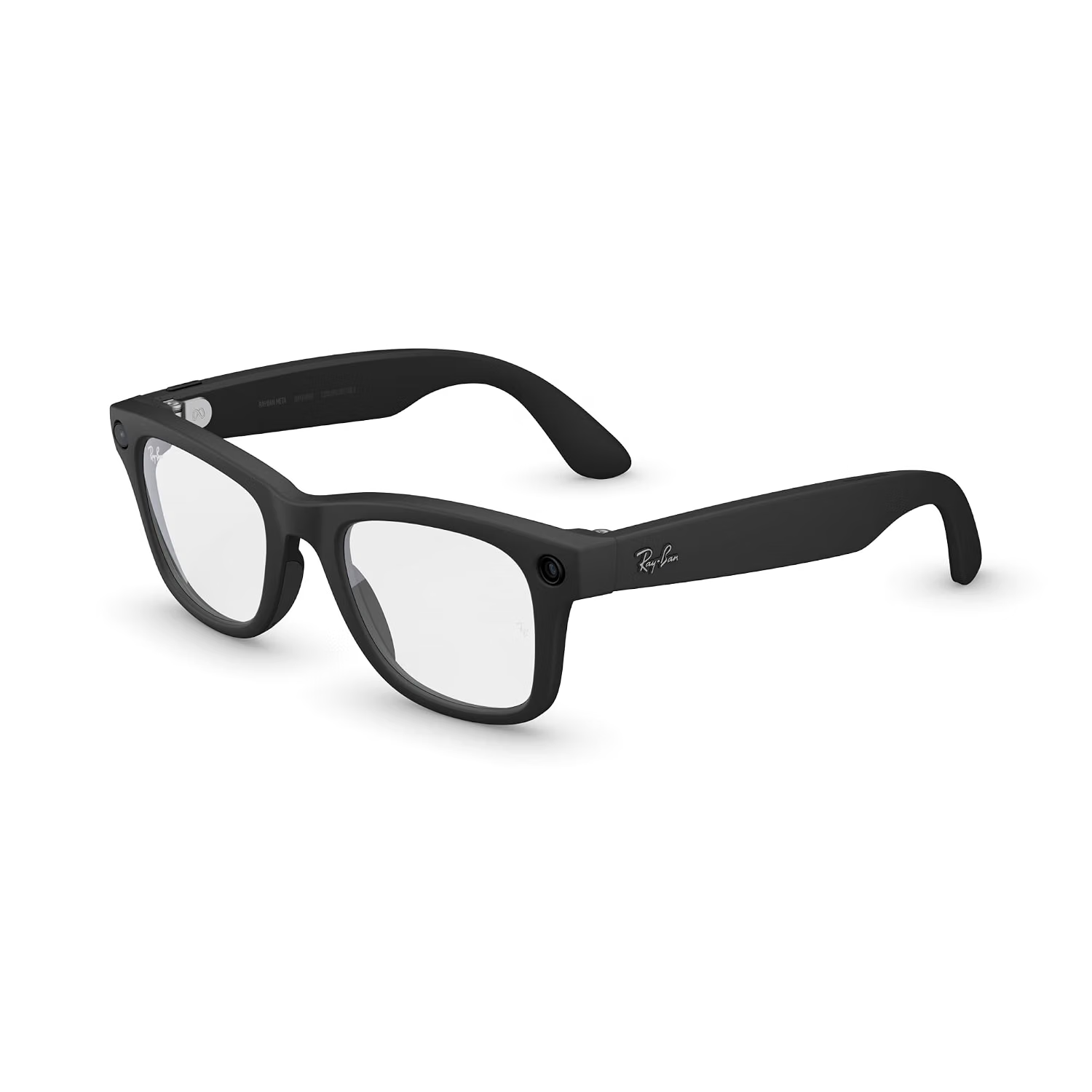
The Meta Ray-Ban Wayfarer Smart AI Glasses (Gen 2) in Matte Black with Clear Lenses are part of this emerging category. The Wayfarer shape is based on a familiar eyewear design, while the smart features add capabilities such as cameras, open-ear audio, voice interaction, and AI-assisted functions.
This combination creates a different way of interacting with technology. Rather than taking a phone out of a pocket, a user can potentially use voice commands, capture an image from their point of view, listen to audio, or interact with supported AI features through the glasses.
At the same time, smart glasses introduce considerations that do not apply to ordinary eyewear. Battery life, smartphone compatibility, connectivity, camera privacy, charging, fit, and the availability of specific features all matter. AI functions can also depend on software, internet access, account settings, and regional availability.
Understanding the product as a connected wearable rather than simply a pair of glasses makes it easier to evaluate where it can fit into everyday life.
This guide explores the major features of the Meta Ray-Ban Wayfarer Smart AI Glasses (Gen 2), practical applications, setup considerations, privacy issues, and the differences between smart glasses and other wearable technology.
What Are Meta Ray-Ban Smart AI Glasses?
The Meta Ray-Ban smart glasses combine the physical form of Ray-Ban eyewear with electronic components developed for connected and AI-assisted functions.
The glasses are designed to look and function as eyewear while also providing technology for capturing media, communicating, listening to audio, and interacting with digital assistants.
Unlike augmented-reality glasses that place graphics or virtual objects directly into the user’s field of vision, this category of smart glasses generally focuses on audio, cameras, microphones, and voice interaction.
That distinction is important.
A user does not necessarily look at a screen inside the glasses to receive information. Instead, supported features can communicate through audio or be accessed through voice.
The result is a more subtle approach to wearable technology.
For some activities, this can be useful because the user can keep their hands free and remain focused on their surroundings.
Key Features
Wayfarer-Inspired Design
The Wayfarer shape is one of the most recognizable elements of the product.
The smart components are incorporated into an established eyewear style rather than being presented as a visibly futuristic headset.
This can make the glasses suitable for everyday wear in situations where users would normally wear sunglasses or prescription-style eyewear, depending on the lens configuration and individual needs.
The Matte Black finish provides a relatively neutral appearance that can work with a wide range of clothing and personal styles.
As with any glasses, however, appearance is only one consideration. Fit, weight distribution, bridge comfort, frame dimensions, and compatibility with a user’s face shape can influence how comfortable the glasses are for extended periods.
Clear Lenses
The Amazon listing identifies this configuration as having clear lenses.
Clear lenses are different from tinted sunglasses and are generally intended for ordinary indoor or low-light use rather than direct sunlight protection.
This distinction matters when considering how the glasses will be used.
Someone who spends much of the day indoors may prefer a clear-lens configuration, while someone primarily looking for outdoor eyewear may have different lens requirements.
Users should also distinguish between lens appearance and lens protection. Specific optical properties should be verified from the current product documentation rather than assumed from the frame design.
Integrated Camera
One of the defining characteristics of Meta’s smart glasses is the integrated camera system.
A camera mounted within the glasses allows users to capture photographs and video from a first-person perspective.
This can provide a different perspective from conventional smartphone photography.
Instead of holding a phone at arm’s length, the wearer can potentially capture moments while keeping their hands available for other tasks.
This can be useful when documenting travel, outdoor activities, demonstrations, or everyday moments.
However, the camera also introduces significant privacy responsibilities.
People nearby may not always realize that a camera is active, so users should pay attention to local laws, venue policies, and social expectations before recording.
Open-Ear Audio
The glasses incorporate built-in speakers that allow audio to be heard without traditional in-ear earbuds.
This approach can be useful for listening to music, podcasts, navigation instructions, calls, or other supported audio content while maintaining awareness of surrounding sounds.
Open-ear audio does not mean complete isolation from the environment.
However, users should still keep volume at a level that allows them to remain appropriately aware of traffic, people, alarms, and other environmental sounds.
Microphones
Integrated microphones enable hands-free interaction.
Voice commands can be used to initiate supported functions without physically operating a smartphone.
Microphones can also support phone calls and other communication features.
Because the glasses are wearable throughout everyday environments, microphone privacy is worth considering alongside camera privacy.
AI-Assisted Features
The inclusion of AI is an important part of the product category.
AI-enabled smart glasses can potentially respond to questions, provide information, interpret visual content, assist with certain tasks, and interact through natural voice commands.
The exact AI capabilities available to a particular device can depend on Meta’s current software, account requirements, internet connectivity, location, language support, and feature rollout.
AI responses should also be treated as generated assistance rather than infallible sources of information.
For important decisions, users should independently verify relevant information.
Hands-Free Interaction
Hands-free control is one of the main ideas behind smart glasses.
A smartphone requires a user to look down, hold the device, and interact with a screen.
Smart glasses can move some interactions into the user’s immediate environment.
A user might ask a voice question, capture a photo, start an audio experience, or interact with a supported assistant without removing a phone from a pocket.
This can be especially convenient during activities where using a smartphone is inconvenient.
How the Smart Glasses Can Be Used
Capturing First-Person Photos
One of the most natural applications is photography.
Because the camera is positioned on the glasses, it captures approximately what the wearer is looking toward.
This can produce a perspective that is difficult to reproduce with a conventional smartphone.
Travelers can use this approach when walking through a city, exploring a museum where photography is permitted, or documenting outdoor activities.
The hands-free nature can also make it easier to capture spontaneous moments.
However, users should always respect photography restrictions and other people’s privacy.
Recording Video
Hands-free video recording can be useful for documenting activities where holding a camera is inconvenient.
For example, a person working on a hobby project might want to record a process while keeping both hands available.
Similarly, travelers may find first-person video useful for documenting parts of a journey.
The quality and practical recording duration depend on the device’s hardware, battery, storage, software, and environmental conditions.
Long recording sessions can consume battery power more quickly than occasional short captures.
Listening to Music
The integrated speakers can provide a convenient way to listen to audio without putting earbuds into the ears.
This can work well during everyday activities such as walking, working at a desk, or traveling.
Audio preferences vary significantly, so users should adjust volume appropriately and remain aware of their surroundings.
Smart glasses are also not necessarily a replacement for dedicated headphones in every situation.
People seeking strong noise isolation or high-fidelity listening may prefer conventional audio equipment designed specifically for those purposes.
Making Phone Calls
Integrated microphones and speakers can turn the glasses into a hands-free communication device when connected to a compatible smartphone.
This can be useful while walking, preparing food, organizing a workspace, or performing another activity where holding a phone is inconvenient.
Call quality can depend on the surrounding environment, network connection, Bluetooth or other wireless connectivity, and microphone positioning.
Voice-Based Questions
AI-assisted voice interaction can provide another reason to use smart glasses.
A wearer may ask a question without typing it into a smartphone.
This can be useful when the user wants quick information while their hands are occupied.
However, AI-generated answers can contain mistakes or misunderstandings.
The glasses should therefore be viewed as a convenient interface to AI features rather than as an unquestionable authority.
Asking About Visual Information
One interesting application of camera-equipped AI glasses is visual assistance.
Depending on the supported software, a user may be able to ask the system about something in front of the camera.
Potential examples could include asking about an object, requesting information about visible content, or getting assistance understanding something encountered during everyday activities.
The availability and accuracy of these functions can vary.
Users should also remember that visual AI interpretation is not equivalent to professional identification, diagnosis, or expert analysis.
Travel and Exploration
Smart glasses can be useful during travel because they combine several functions into one wearable device.
A traveler can potentially take photographs, record video, listen to audio, make calls, and interact with supported AI functions while keeping their hands free.
This can reduce the number of times a phone needs to be taken out.
At the same time, international travelers should consider network availability, roaming, battery charging, local privacy laws, and restrictions on recording in certain locations.
Everyday Memory Capture
Some people use smartphones to document everyday moments that they might otherwise forget.
Smart glasses provide another way to capture those moments.
Because the camera is integrated into eyewear, the device can potentially be ready when an interesting situation occurs.
However, convenience should not override consent.
Recording people in private or sensitive situations can create ethical and legal problems, even when a device technically allows recording.
Who May Find Smart AI Glasses Useful?
Technology Enthusiasts
People interested in emerging wearable technology may appreciate the combination of conventional eyewear and connected computing.
Smart glasses offer an alternative to interacting with technology exclusively through phones and computers.
Frequent Travelers
Travelers can benefit from hands-free photography, audio, communication, and selected AI functions.
The glasses can be useful when navigating unfamiliar environments or documenting experiences.
However, travelers should check local laws and venue rules concerning photography and recording.
Content Creators
The first-person camera perspective can be useful for creators who want to document activities from their own viewpoint.
This can be particularly relevant for demonstrations, hobbies, travel content, and behind-the-scenes material.
Creators should still consider consent, copyright, privacy, and platform requirements before recording or publishing material involving other people.
People Who Prefer Hands-Free Interaction
Users who frequently perform tasks with both hands occupied may appreciate voice-based control and integrated audio.
The glasses can provide selected smartphone-like functions without requiring constant screen interaction.
Users Interested in AI
The glasses can also appeal to people who want to experiment with AI in a more natural, conversational format.
Instead of typing a prompt, users can speak to a supported AI assistant and receive an audio response or interact with AI-related features.
Important Things to Consider
Battery Life
Battery capacity is an important consideration for any camera-equipped wearable.
Using the camera, wireless connectivity, audio, and AI functions can consume more power than simply wearing ordinary glasses.
Battery performance can also vary depending on usage patterns, temperature, software, network conditions, and other factors.
Users who plan long recording sessions or extensive daily use should consider how often the glasses will need to be recharged.
Charging Case
Smart glasses generally require a charging solution that differs from ordinary eyewear.
The charging case can become an important part of the daily routine because it provides a convenient place to store and recharge the glasses.
Users should keep the case charged and avoid treating it like a passive glasses case.
When traveling, remember that both the glasses and charging equipment are part of the overall setup.
Smartphone Dependence
Smart glasses are not completely independent computing systems.
Many features depend on a paired smartphone, companion application, wireless connection, Meta account, or internet access.
Before purchasing, users should check current compatibility requirements for their phone and operating system.
Software features can also change over time.
AI Availability
AI features are particularly dependent on software.
A feature available in one country or account configuration may not necessarily be available in another.
Language support and regional availability can also differ.
Users should therefore avoid assuming that every AI capability demonstrated in promotional material will necessarily be available under every configuration.
Camera Privacy
Camera-equipped glasses require greater awareness than ordinary glasses.
The wearer should know when recording is occurring and understand how the device communicates that state.
When recording other people, consent and local laws should be respected.
Certain locations, including workplaces, private properties, schools, medical environments, museums, or events, may have specific rules about photography and recording.
Audio Privacy
Open-ear speakers can be convenient, but they also mean that audio may be audible to people nearby depending on volume and surroundings.
Users should consider the environment before playing private or sensitive information through the glasses.
Internet Connectivity
AI services and certain connected functions may require internet access.
In areas with poor connectivity, some features may work differently or become temporarily unavailable.
This is especially relevant during travel, outdoor activities, or locations where cellular service is unreliable.
Frame Fit
Smart glasses contain electronics that conventional glasses do not need.
This can affect weight distribution and overall dimensions.
A comfortable fit is important because smart glasses are designed to be worn rather than simply placed on a desk.
Users should check frame dimensions and available fitting options carefully.
Clear Lenses and Sunlight
Clear lenses are appropriate for many indoor environments but should not automatically be treated as a substitute for sunglasses.
People spending significant time outdoors should verify the optical protection provided by the specific lens configuration.
Prescription Lens Compatibility
Users who normally wear prescription glasses should check whether the particular frame and lens configuration supports prescription lens replacement or an approved optical solution.
Compatibility can depend on the frame model, prescription requirements, and authorized optical providers.
It is important not to assume that every prescription can be accommodated simply because the glasses resemble conventional eyewear.
Smart Glasses vs. Smartphones
Smart glasses and smartphones serve different roles.
A smartphone remains a much more comprehensive computing platform.
It offers a large display, keyboard, extensive application ecosystem, substantial processing capabilities, and numerous communication tools.
Smart glasses focus on specific hands-free interactions.
They can be useful when the phone is inconvenient to hold or when the user wants a first-person camera perspective.
Rather than viewing smart glasses as a complete smartphone replacement, it is more accurate to think of them as a wearable extension of a connected device ecosystem.
Smart Glasses vs. Wireless Earbuds
Wireless earbuds primarily focus on audio and communication.
Smart glasses add cameras, microphones, and a physical eyewear form.
If the primary goal is listening to music or making calls, earbuds may provide a more specialized audio experience.
Smart glasses become more relevant when hands-free photography, AI interaction, and wearable integration are also important.
The choice depends on which functions matter most to the user.
Smart Glasses vs. Smartwatches
Smartwatches provide information through a wrist-mounted display and can support notifications, health-related tracking, apps, communication, and other features depending on the model.
Smart glasses use audio, voice, and cameras to provide a different interaction model.
A smartwatch is useful when visual information on the wrist is important.
Smart glasses can be useful when the user wants to keep their hands free and avoid looking down at a screen.
The two categories can also complement each other rather than compete directly.
Smart Glasses vs. Augmented-Reality Glasses
These terms are sometimes used interchangeably, but they describe different approaches.
Smart AI glasses such as this type generally emphasize cameras, microphones, speakers, voice interaction, and connected services.
Augmented-reality glasses typically focus on displaying digital information within or over the user’s field of view.
The Meta Ray-Ban approach does not mean that the wearer is constantly looking at a transparent computer screen.
Understanding this distinction prevents unrealistic expectations about what the glasses are designed to do.
Getting Started With Smart Glasses
Setting up connected eyewear usually involves several steps.
Start by charging the glasses and their charging case according to the manufacturer’s instructions.
Next, install the required companion application on a compatible smartphone.
The application can guide the pairing process and account configuration.
Once connected, users should explore the available controls and permissions.
It is worth understanding which features require the smartphone, which rely on internet access, and which functions can be used directly through the glasses.
The camera and microphone permissions should also be reviewed carefully.
After basic setup, test the audio, voice controls, and camera in an appropriate environment.
Taking time to learn the controls can make the glasses easier to use without repeatedly reaching for the phone.
Privacy and Responsible Use
Smart glasses make privacy especially important because the camera and microphones are attached to a device that can be worn almost anywhere.
Responsible use starts with awareness.
Before recording, consider whether the people around you would reasonably expect privacy.
Follow applicable laws and venue policies.
Avoid recording sensitive situations without appropriate permission.
Be particularly careful in medical, educational, workplace, and private environments.
It is also useful to review the companion application’s privacy settings and understand how captured media is transferred or stored.
Technology can make recording easy, but ease of recording does not eliminate the responsibilities associated with it.
Using AI Responsibly
AI can make smart glasses more useful, but it also introduces another layer of uncertainty.
AI systems can misunderstand speech, misinterpret images, or generate incorrect information.
For casual questions, this may simply be an inconvenience.
For high-stakes topics involving health, legal matters, finances, safety, or important decisions, AI-generated information should be independently verified using appropriate authoritative sources.
The same principle applies to visual AI.
If an AI system identifies an object, location, text, or other visual information, the result should not automatically be assumed to be correct.
Smart glasses can make AI more accessible, but they do not eliminate the need for human judgment.
Maintaining the Glasses
Because the glasses combine conventional eyewear with electronic components, maintenance requires some care.
Clean the lenses using methods appropriate for the specific lens material.
Avoid exposing the electronic components to conditions outside the manufacturer’s recommendations.
Store the glasses in their charging case when they are not being worn.
Keep the charging contacts clean and ensure the case has sufficient power.
Avoid leaving the glasses in extreme heat, especially inside a parked vehicle, unless the manufacturer specifically states that such conditions are acceptable.
Good care can help preserve both the optical and electronic components.
Frequently Asked Questions
What are Meta Ray-Ban smart glasses?
They are connected eyewear that combines a conventional glasses design with cameras, microphones, speakers, wireless connectivity, and supported smart or AI features.
Do the glasses have a camera?
Yes. The smart-glasses design includes an integrated camera intended for hands-free photography and video capture.
Can the glasses record video?
The integrated camera is designed to capture video as well as photographs, subject to the device’s supported recording capabilities, storage, battery, and software.
Can the glasses play music?
The integrated speakers are designed to provide audio playback without requiring conventional earbuds.
Can I make phone calls with the glasses?
Supported connected functionality can allow hands-free calling through the glasses when properly paired with a compatible smartphone and service.
Do I need a smartphone?
Many smart features rely on a compatible smartphone and companion software.
Users should check the current compatibility requirements before setup.
Do the glasses display information in front of my eyes?
This category of Meta Ray-Ban smart glasses is not primarily an augmented-reality display system.
Its interaction model focuses more on audio, voice, cameras, and connected services rather than projecting graphics into the user’s field of view.
What does AI do on smart glasses?
Supported AI functions can provide voice-based assistance and may be able to interpret certain visual or contextual information.
Available features can depend on software, region, language, account configuration, and internet connectivity.
Can AI identify objects?
Depending on currently supported features, AI may be able to interpret certain objects or visual information captured by the camera.
Results should be treated as AI-generated assistance rather than guaranteed identification.
Are clear lenses suitable for outdoor use?
Clear lenses are primarily associated with ordinary, non-tinted eyewear.
Users should verify the specific optical protection and intended use of the particular lens configuration rather than assuming that clear lenses provide the same protection as sunglasses.
Can prescription lenses be used?
Prescription-lens compatibility depends on the particular frame, prescription, and approved lens options.
Users who need prescription lenses should verify compatibility before purchasing or modifying the glasses.
Are the glasses waterproof?
Users should consult the manufacturer’s current specifications for water and environmental resistance.
Electronic eyewear should not be exposed to water beyond its stated protection rating.
How long does the battery last?
Battery performance depends on usage, including camera recording, audio, calls, connectivity, and AI functions.
Actual runtime can therefore vary from one user to another.
For exact current battery specifications, consult the manufacturer’s documentation.
Can I use the glasses without an internet connection?
Some functions may continue to operate locally, while AI and other connected features can depend on internet access.
The exact offline capabilities depend on the current software and configuration.
Are smart glasses private?
Privacy depends partly on how the device is used.
Because the glasses contain cameras and microphones, users should be particularly careful about recording other people and should follow applicable laws and venue rules.
Can smart glasses replace a smartphone?
They are not designed to provide the full range of functions offered by a smartphone.
Instead, they can provide selected hands-free capabilities that complement a smartphone.
Are they suitable for travel?
Smart glasses can be useful for travel because they combine photography, audio, communication, and selected AI functions in a wearable format.
Travelers should consider battery charging, connectivity, local laws, and recording restrictions.
Practical Ways to Incorporate Smart Glasses Into Everyday Life
The most useful approach is to start with a few functions rather than trying to use every available feature simultaneously.
For example, a user might initially use the glasses for hands-free calls and music.
After becoming familiar with those controls, camera functions can be incorporated into travel or hobby activities.
AI features can then be explored as an additional tool for voice-based questions or supported visual assistance.
This gradual approach can make the technology feel more natural.
It also helps users determine which functions genuinely fit their routines.
For travelers, the glasses may become a convenient first-person camera and audio device.
For content creators, the camera perspective may be useful for documenting specific activities.
For everyday users, hands-free calling and audio may be more valuable than advanced AI functions.
There is no requirement to use every feature simply because the device supports it.
Final Thoughts
The Meta Ray-Ban Wayfarer Smart AI Glasses (Gen 2) represent a distinctive approach to wearable technology by combining familiar eyewear with cameras, microphones, speakers, wireless connectivity, and AI-assisted functionality.
The clear-lens configuration and Matte Black Wayfarer-style frame give the device the general appearance of conventional eyewear, while the integrated electronics introduce capabilities that extend well beyond ordinary glasses.
Hands-free photography, video recording, audio playback, calls, voice interaction, and supported AI functions can all contribute to a more convenient way of interacting with technology in selected situations.
At the same time, smart glasses are not a universal replacement for smartphones, earbuds, smartwatches, or augmented-reality headsets. Each category is designed around different forms of interaction.
Potential users should also consider battery life, smartphone compatibility, software availability, internet requirements, frame fit, lens needs, and privacy.
The camera and microphones are particularly important to think about because wearing a recording-capable device can affect the privacy expectations of people nearby. Responsible use means respecting consent, local laws, venue policies, and sensitive environments.
AI features also benefit from a measured approach. They can make information and certain digital interactions more accessible, but generated responses and visual interpretations can contain errors and should not be treated as authoritative for high-stakes decisions.
Ultimately, the appeal of smart AI glasses comes from reducing the distance between the wearer and selected digital functions. Instead of reaching for a phone every time, users can interact through voice, audio, and a camera integrated into something they are already wearing.
For people interested in hands-free technology, connected eyewear, first-person media capture, and AI-assisted interaction, this type of device offers a different way to approach everyday computing.
Leave a Reply