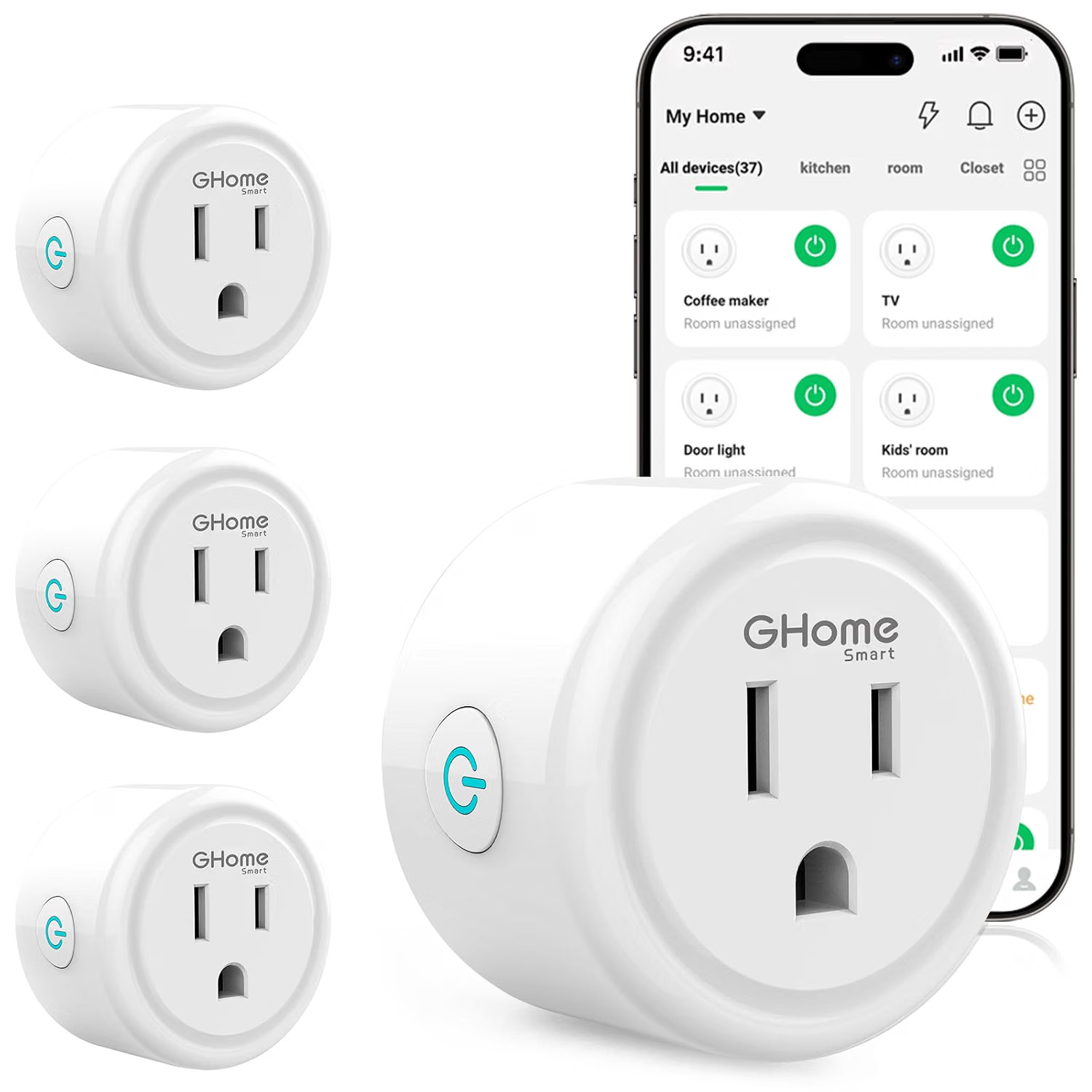
Smart home technology has made it easier to control everyday electrical devices without having to interact with them manually every time. From lamps and fans to seasonal decorations and small household appliances, a smart plug can add basic connected functionality to devices that were not originally designed as smart products.
The GHome Smart Plug is a WiFi-enabled smart plug designed to provide remote and voice-based control for compatible household devices. It is intended to work with platforms such as Amazon Alexa and Google Home, allowing users to incorporate connected appliances into a broader smart home routine.
Rather than replacing an appliance, a smart plug generally acts as an intermediary between the wall outlet and the appliance’s power connection. This makes the concept relatively simple: plug the smart device into the smart plug, connect the plug to a compatible WiFi network, configure it through the appropriate smart-home ecosystem, and then use an app or supported voice assistant to control the connected outlet.
That simple concept can have practical applications throughout a home. A bedside lamp can potentially be switched off without getting out of bed. A living-room light can be controlled remotely. A regular fan can become part of a scheduled routine, provided the appliance resumes operation when power is supplied. Holiday lighting can be placed on a schedule instead of being switched manually every evening.
At the same time, smart plugs have limitations. They do not automatically make every appliance “smart,” and compatibility depends on the appliance, network, smart-home platform, and electrical requirements. Understanding those details is important before incorporating a WiFi smart plug into a home.
This guide explains the GHome Smart Plug concept, its main features, practical applications, compatibility considerations, and questions worth considering when setting up a connected outlet.
What Is a WiFi Smart Plug?
A WiFi smart plug is a small electrical accessory that sits between a wall outlet and another electrical device.
The connected appliance still performs its normal function, while the smart plug controls whether electrical power is supplied through the outlet. Depending on the model and its software ecosystem, this control can be performed through a smartphone application, voice assistant, schedule, or automation.
This distinction is important because a smart plug does not usually control the internal settings of an appliance.
For example, consider a traditional table lamp with a physical switch. A smart plug can control the electrical supply to the lamp, but it does not necessarily change the lamp’s brightness or color. Similarly, a conventional fan may be switched on or off through the smart plug, but the smart plug does not inherently provide control over the fan’s speed.
The most useful applications are therefore devices whose desired behavior can be achieved simply by turning their power supply on or off.
The GHome Smart Plug follows this general approach while adding WiFi connectivity and compatibility with voice-control ecosystems such as Alexa and Google Home.
Key Features of the GHome Smart Plug
WiFi Connectivity
One of the central features of the GHome Smart Plug is wireless network connectivity.
Instead of requiring a dedicated wired connection, the smart plug communicates with a home WiFi network. This allows users to interact with the connected outlet through supported smart-home software.
WiFi-based smart plugs can be particularly convenient because they can fit into an existing home network without requiring a separate hub for every individual outlet.
However, the exact WiFi requirements should always be checked against the current product documentation and setup instructions. Some smart plugs are designed primarily around specific network configurations or WiFi bands, and compatibility can vary between products.
Alexa Compatibility
The GHome Smart Plug is designed to work with Amazon Alexa.
This means users with a compatible Alexa setup may be able to control a connected device using voice commands after completing the necessary account linking and device configuration.
For example, a lamp connected to the smart plug could potentially be assigned a recognizable name such as “bedside lamp.” Once properly configured, a user could use a voice command to switch that outlet on or off.
Voice control can be useful in situations where reaching the physical outlet is inconvenient, such as when a device is positioned behind furniture or when someone wants to control several devices as part of a routine.
The exact commands and available capabilities depend on the smart-home platform and the way the device is configured.
Google Home Compatibility
Google Home compatibility provides another route for voice and smart-home control.
Users who already have a Google-based smart home can potentially integrate the smart plug into their existing environment rather than maintaining a completely separate control system.
This can be useful for households that use Google Assistant-compatible devices throughout the home.
As with Alexa integration, initial configuration is normally required. The smart plug must be connected to the appropriate application or service, and permissions or account linking may be necessary before voice control becomes available.
Remote Control
A WiFi smart plug can provide a way to control an outlet without physically touching the plug.
Remote control can be useful for ordinary household situations. A user might want to switch a lamp on before entering a room, turn off a connected device after leaving home, or check whether an outlet-controlled appliance has been switched off.
The practical usefulness of remote access depends on having a working network connection and properly configured software.
Remote control should also not be confused with remote monitoring. Unless a smart plug specifically provides energy monitoring or another form of feedback, users should not assume that the app can determine whether an appliance is actually operating correctly.
Scheduling and Automation
Smart plugs can be particularly useful when their control capabilities are combined with schedules or routines.
Instead of manually switching a connected device on and off every day, a user can potentially create an automated schedule through the compatible smart-home system.
A simple example would be a decorative lamp that should turn on in the evening and switch off later at night.
Another application could involve a small household device that should receive power during a particular period.
Scheduling can reduce repetitive manual tasks, but users should consider the appliance itself before creating an automated routine. Not every device is designed to safely or predictably restart whenever power is restored.
Compact Everyday Functionality
A smart plug is designed around a straightforward purpose: adding connected on/off control to a conventional electrical device.
This makes the concept suitable for incremental smart-home upgrades.
Instead of replacing every appliance with a smart version, homeowners can potentially connect selected existing devices to smart plugs where appropriate.
That approach can be useful when an appliance already performs the required function but lacks convenient remote or scheduled control.
How the GHome Smart Plug Can Be Used
Controlling Table Lamps
Lighting is one of the most straightforward smart-plug applications.
A conventional table lamp can be connected to the smart plug so that the outlet controls whether the lamp receives power.
This can be useful for bedside lamps, desk lamps, floor lamps, or accent lighting.
The main limitation is that the lamp itself must generally be compatible with simple power switching. If a lamp requires a separate electronic control system or has special operating behavior, the experience may differ.
Creating Evening Lighting Schedules
A smart plug can also be useful for scheduled lighting.
For example, a household could create a routine that turns an entryway lamp on at a particular time and turns it off later.
This can reduce the need to manually operate the light every evening.
Schedules can also be adjusted when household routines change. Users should periodically review automated routines so that devices do not remain powered unnecessarily.
Holiday and Decorative Lighting
Seasonal lighting is another practical application.
Christmas lights, decorative lamps, and other suitable plug-in decorations can potentially be controlled according to a schedule.
Instead of manually switching decorative lighting on each evening, users can configure an automation around their preferred schedule.
This can be particularly convenient when several decorative devices are used throughout the home.
However, electrical load and the manufacturer’s specifications should be considered before connecting multiple devices through an outlet.
Fans and Small Appliances
A compatible fan or small appliance may also be controlled through a smart plug.
The important consideration is how the appliance behaves when electricity is restored.
Some devices return to their previous operating state after losing and regaining power. Others remain switched off until their physical button is pressed again.
For smart-plug automation, the former behavior may be more useful because the smart plug can effectively control the appliance by controlling its power supply.
Users should never assume that an appliance will automatically restart after power is restored. Checking the appliance’s instructions is a better approach.
Bedroom Applications
Smart plugs can be convenient around a bedroom.
A bedside lamp is a common example, but other appropriate low-power devices may also benefit from scheduled or remote outlet control.
A user could create a nighttime routine that switches a lamp off at a chosen time, reducing the need to reach across the room.
Smart plugs can also be helpful for people who prefer controlling certain household devices through voice commands rather than physical switches.
Home Office Applications
A home office can contain several devices that are frequently switched on and off.
A smart plug can potentially be used for suitable lamps, decorative lighting, or other compatible equipment.
However, it is important to distinguish convenience from electrical management.
A smart plug should not automatically be treated as a replacement for a properly designed power distribution system. Computers, monitors, printers, networking equipment, and other electronics may have specific electrical requirements and should be connected according to their manufacturers’ recommendations.
Routines for Daily Activities
The combination of scheduling and voice control can make a smart plug more useful than a simple remote-controlled outlet.
For example, a morning routine could switch on a suitable lamp at a predetermined time. An evening routine could switch it off later.
The goal is not necessarily to automate everything in the home. Instead, smart plugs can be used selectively for repetitive tasks where simple power control is sufficient.
Who May Find a Smart Plug Useful?
People Beginning a Smart Home Setup
A WiFi smart plug can be an accessible introduction to smart-home technology.
Users do not necessarily need to replace an existing appliance to experiment with remote control or automation. A compatible lamp or other suitable device can serve as a starting point.
This incremental approach allows homeowners to determine which types of automation are genuinely useful in their daily routines.
Users of Alexa or Google Home
People who already use Amazon Alexa or Google Home may appreciate having another compatible device within their existing ecosystem.
Instead of managing a completely separate control method, the smart plug can potentially become part of an established voice assistant setup.
The actual experience will depend on the user’s existing devices, software versions, account configuration, and network.
Busy Households
Schedules can help reduce small repetitive tasks.
A household that regularly switches the same lamps or decorative devices on and off at predictable times may find automation convenient.
The benefit is less about adding complexity and more about removing unnecessary manual steps.
Home Office Users
People working from home may find scheduled lighting and voice-controlled devices useful during the workday.
For example, a desk lamp or ambient light can be incorporated into a routine without requiring the user to reach for a physical switch.
Again, the smart plug is most appropriate when the connected device works reliably with basic power switching.
Important Things to Consider Before Setup
Check the Electrical Specifications
Electrical compatibility should always come first.
Before connecting an appliance, check the smart plug’s rated electrical limits and compare them with the appliance’s requirements.
High-power appliances can place substantial demands on an outlet. A smart plug designed for ordinary household electronics should not automatically be assumed suitable for every appliance in the home.
When in doubt, consult the product documentation or a qualified electrician.
Consider the Appliance’s Power-On Behavior
This is one of the most overlooked aspects of smart-plug use.
Suppose an appliance has a physical power button. If the button must be pressed manually every time the appliance receives electricity, a smart plug may only be able to control the electrical supply rather than the appliance’s actual operating state.
For automation to work as expected, the appliance should have an appropriate power-on behavior.
This is especially important for fans, coffee equipment, heaters, and other appliances that may have different operating characteristics.
WiFi Coverage Matters
Because the GHome Smart Plug uses WiFi connectivity, network coverage is an important part of the overall setup.
An outlet located far from the router may experience weaker connectivity depending on the structure of the home and the location of networking equipment.
Walls, floors, furniture, and other sources of interference can affect wireless performance.
A smart plug should ideally be installed where the home network provides reliable coverage.
Smart-Home Account Configuration
Voice control generally requires more than simply plugging the device into a wall outlet.
The user may need to install or configure the relevant application, connect the smart plug to WiFi, sign into the appropriate smart-home account, and enable the necessary integration.
Naming devices clearly can also make voice commands easier.
Instead of assigning several outlets confusing names, users might choose simple labels such as “Desk Lamp,” “Bedroom Lamp,” or “Living Room Light.”
Security and Privacy
Any connected home device should be treated as part of the household’s digital environment.
Users should maintain strong account credentials, keep supported applications updated, and use a secure home WiFi network.
It is also useful to understand what permissions an application requests and which smart-home accounts are linked to the device.
Connected devices do not eliminate the need for ordinary cybersecurity practices.
Power Interruptions
A WiFi smart plug depends on electricity and network connectivity.
If the household experiences a power outage or the WiFi network becomes unavailable, remote control may not function normally until the relevant systems are restored.
Users should therefore avoid relying on a smart plug as the only control mechanism for anything that requires continuous operation or critical availability.
Avoid Using Smart Plugs for Critical Equipment
A smart plug is generally intended for convenience rather than life-critical or safety-critical control.
It should not be treated as a substitute for dedicated electrical safety equipment or professional automation systems.
Devices involved in heating, cooling, medical care, security, or other critical functions require particular caution. The appliance manufacturer’s instructions should take priority.
Smart Plug vs. Smart Appliance
A smart plug and a smart appliance solve related but different problems.
A smart plug primarily controls electrical power.
A smart appliance usually contains its own communication hardware and software, allowing more detailed control of its internal functions.
For example, a smart plug might allow a traditional lamp to be switched on or off remotely. A smart bulb, by comparison, may allow brightness, color temperature, or color adjustments depending on its design.
The choice depends on the level of control required.
If the goal is simply to automate power to an existing appliance, a smart plug may be sufficient. If detailed control of the appliance itself is important, a dedicated smart device may be more appropriate.
Smart Plug vs. Traditional Timer
Traditional plug-in timers provide scheduled electrical control without requiring WiFi.
They can be useful when a user only needs a predictable on/off schedule.
A WiFi smart plug offers a different set of possibilities, including remote access and integration with compatible voice assistants and smart-home routines.
The trade-off is additional setup and dependence on connected technology.
Someone who wants a basic fixed schedule may prefer the simplicity of a conventional timer, while someone interested in app-based control or voice integration may prefer a connected smart plug.
Smart Plug vs. Smart Power Strip
A smart power strip can provide control over multiple outlets within one device.
A smart plug generally focuses on one connected outlet or one electrical connection.
A power strip may be useful when several devices need to be managed together, while individual smart plugs can provide more flexibility for separate appliances.
The right approach depends on the physical layout of the workspace and how devices need to be controlled.
Setting Up a Smart Plug: A Practical Approach
Although exact instructions can vary, the general process for a WiFi smart plug typically involves several steps.
First, inspect the product and confirm that the electrical environment is suitable.
Next, install the manufacturer’s recommended application if required.
The smart plug can then be connected to the household’s compatible WiFi network according to the setup instructions.
Once the device appears in the application, it can usually be assigned a recognizable name.
If Alexa or Google Home integration is desired, the appropriate smart-home account can then be connected according to the supported integration process.
After setup, test the device manually before creating automation.
This is an important step because it confirms that the basic connection works before adding schedules or voice commands.
Once the smart plug responds reliably, users can create routines based on their actual needs.
Starting with one simple automation is often easier than creating a complicated system immediately.
Making Smart-Home Automations Easier to Manage
Good naming is surprisingly important.
If a home contains several smart plugs, unclear names can make voice control frustrating.
Names should be short, descriptive, and associated with the physical location or connected device.
Grouping compatible devices into rooms can also make routines easier to understand.
Users should periodically review their automations. A schedule created months ago may no longer match the household’s current routine.
For example, a lamp that once needed to switch on at a specific time may no longer need that schedule after a change in working hours or seasonal daylight.
Smart-home automation works best when it reflects real habits rather than adding unnecessary complexity.
Frequently Asked Questions
Does the GHome Smart Plug work with Alexa?
The product is designed to work with Amazon Alexa. Appropriate setup and account integration are required, and available functionality can depend on the compatible smart-home environment.
Does it work with Google Home?
The GHome Smart Plug is designed for compatibility with Google Home. Users should follow the current setup instructions to connect the device with their Google-based smart-home environment.
Does a smart plug make any appliance smart?
Not necessarily.
A smart plug generally provides control over electrical power. It does not automatically add advanced functions to the appliance itself.
A lamp, for example, may become remotely controllable, but the smart plug does not necessarily provide brightness control.
Can a smart plug be controlled remotely?
WiFi smart plugs can generally provide remote control through their supported application when the device and home network are properly connected.
Network availability and account configuration can affect remote functionality.
Can I use a smart plug with a lamp?
Lamps are among the simplest applications for smart plugs because many conventional lamps can be controlled simply by switching their power supply.
The lamp should still be operated within the electrical specifications of the smart plug.
Can I use a smart plug with a fan?
A compatible fan may be used with a smart plug, but users should first determine how the fan behaves when power is restored.
If the fan requires a manual button press after losing power, remote power control may not produce the expected result.
Can I schedule a device to turn on automatically?
Scheduling is one of the common uses of connected smart plugs.
The exact scheduling capabilities depend on the supported application and smart-home ecosystem.
Does a smart plug require WiFi?
A WiFi smart plug relies on a compatible wireless network for its connected features. Its remote and smart-home functionality may not work normally if the network connection is unavailable.
Is a smart plug suitable for every appliance?
No.
Electrical ratings, appliance behavior, power requirements, and manufacturer instructions should all be considered.
High-power or specialized appliances may require a different type of electrical control solution.
Can I use several smart plugs in one home?
A household can use multiple smart plugs, provided the network, electrical system, and supported smart-home ecosystem can accommodate them.
Using clear names and room assignments can make multiple devices easier to manage.
Does voice control work immediately after plugging it in?
Usually, additional configuration is necessary.
The smart plug must generally be connected to its supported application and, if desired, linked with a compatible voice assistant such as Alexa or Google Home.
What happens if the WiFi goes down?
Connected features such as remote app control or cloud-based voice commands may become unavailable while the network connection is interrupted.
The exact behavior of the physical outlet after a network interruption depends on the device’s design.
Can I use a smart plug for security purposes?
A smart plug can potentially be used for lighting schedules that make a home appear occupied, but it should not be considered a complete security system.
Security cameras, alarms, locks, and other dedicated security equipment serve different purposes.
Is remote control the same as knowing whether an appliance is working?
No.
Controlling an outlet does not necessarily provide confirmation that the appliance itself is functioning correctly.
Unless the smart plug specifically supports monitoring or feedback features, users should not assume that an “on” state means the appliance is operating normally.
Practical Tips for Everyday Use
A smart plug becomes more useful when it is assigned to a clear purpose.
Start with a device that is simple to control, such as a lamp.
Test manual app control before introducing voice commands.
Once the basic connection is reliable, add a simple schedule.
Use descriptive names that are easy to remember.
Avoid unnecessary automations that make the smart home harder to manage.
Most importantly, consider electrical safety before convenience. A connected outlet should always remain within the manufacturer’s specified operating limits.
It is also worth remembering that automation is optional. A smart plug does not need to control everything in a home to provide value. Selective automation can often be easier to understand and maintain.
Conclusion
The GHome Smart Plug provides a way to introduce WiFi-based control to suitable conventional electrical devices. Its compatibility with Amazon Alexa and Google Home can make it useful for households that already use voice assistants or are beginning to build a connected home environment.
Its practical applications include controlling lamps, scheduling decorative lighting, automating selected household devices, and reducing repetitive manual switching. Remote access and smart-home routines can add convenience without requiring every existing appliance to be replaced with a dedicated smart model.
At the same time, a smart plug has a relatively specific role. It controls the electrical supply rather than automatically transforming an appliance into a fully connected device. Compatibility, electrical requirements, WiFi coverage, appliance power-on behavior, and smart-home account configuration should all be considered before installation.
For simple devices that work well with on/off power control, a WiFi smart plug can be a practical component of a broader smart-home setup. The most effective use is generally one that solves a specific everyday problem while keeping the overall system simple and easy to manage.
Leave a Reply